This is the multi-page printable view of this section. Click here to print.

Return to the regular view of this page.

What's new in Test Automation v3


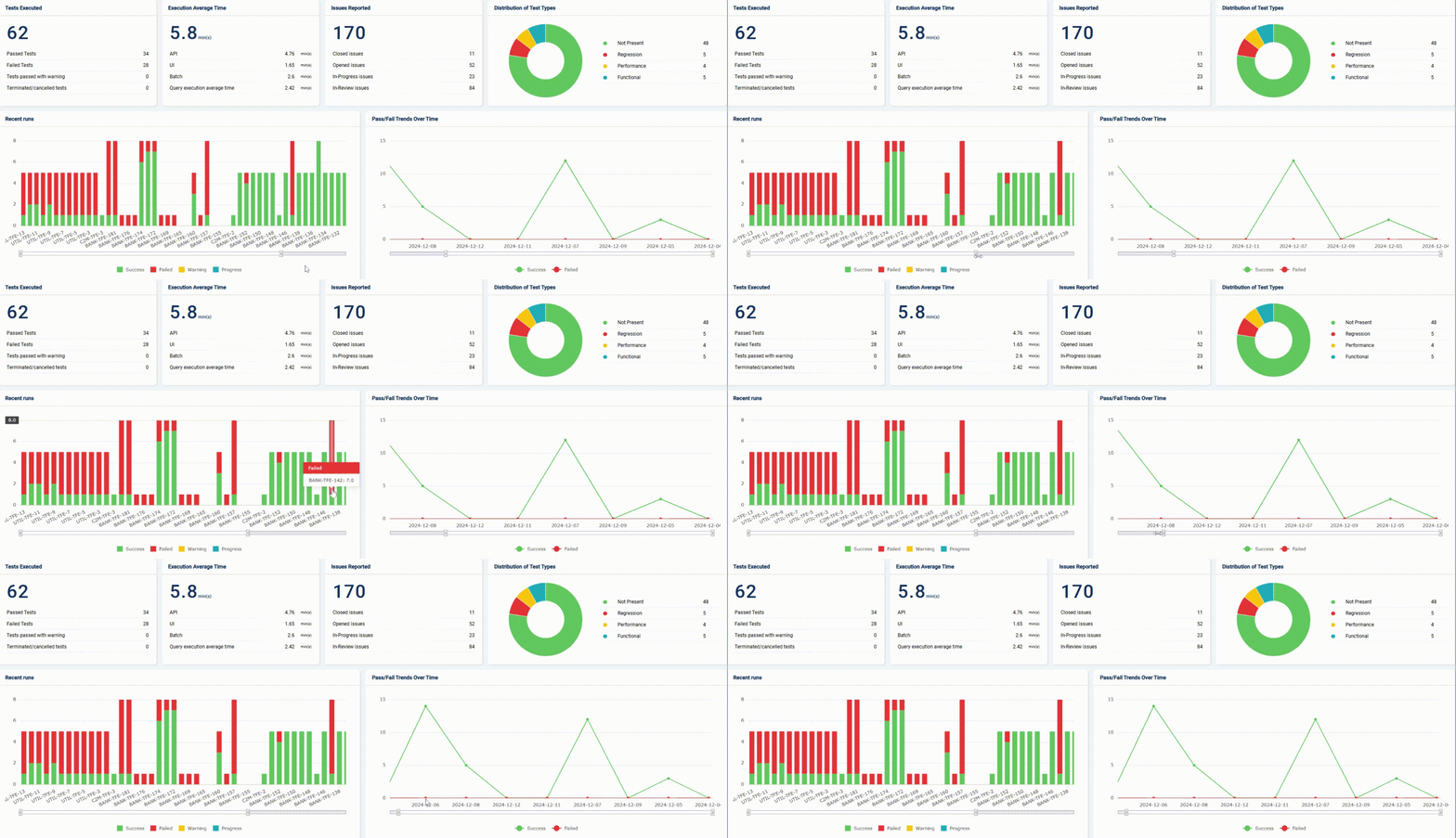
Sleek and modernized UI

TA v3 boasts a completely redesigned user interface focused on usability. The clean, uncluttered, and logically organized interface enables users to navigate effortlessly, locate information quickly, and perform tasks efficiently.


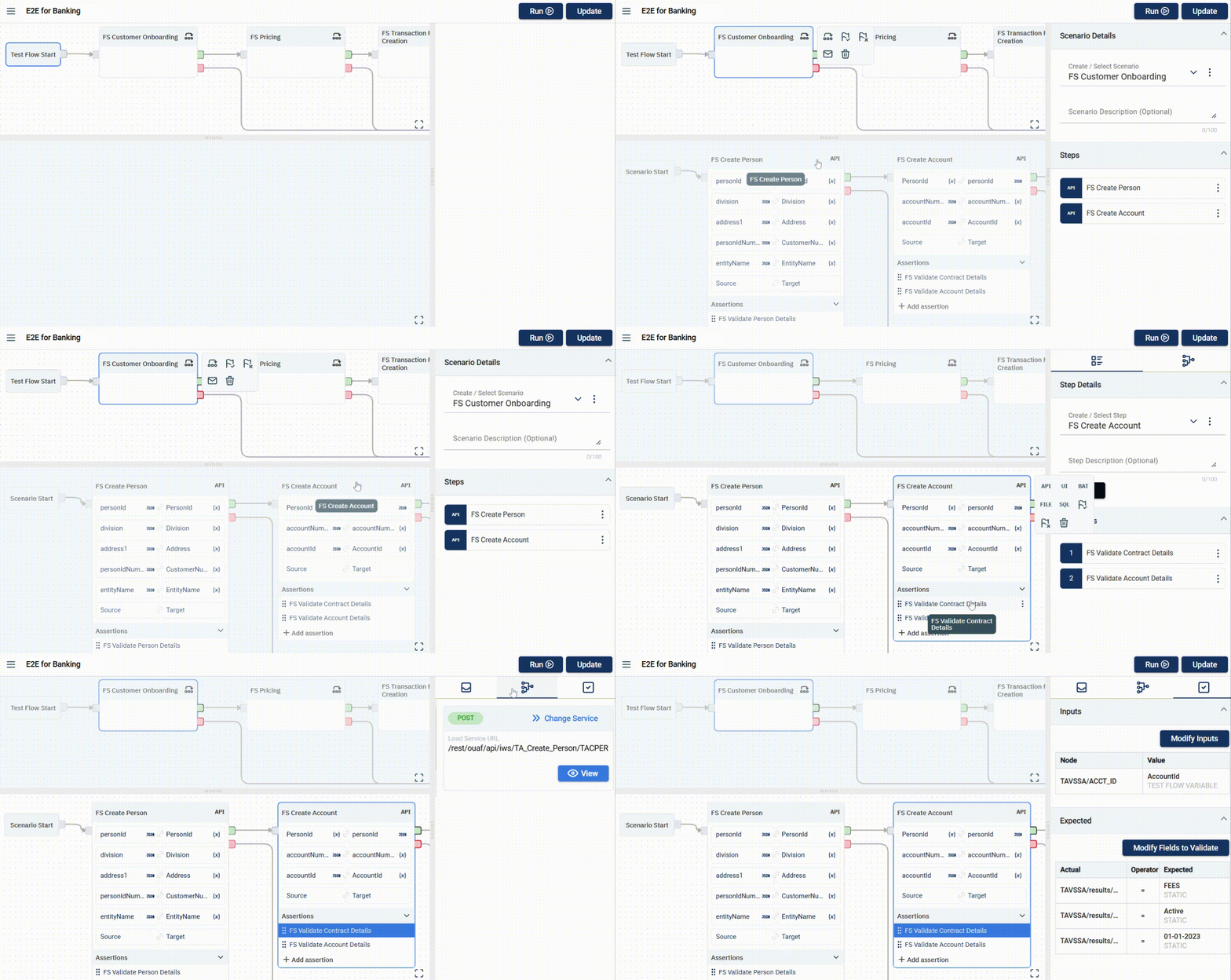
Intuitive Graphical Flows

TA v3 enhances test scenario creation with a user-friendly, visual, top-down workflow. You can effortlessly design end-to-end test scenarios using a drag-and-drop interface, providing a clear visual representation of complex test flows.


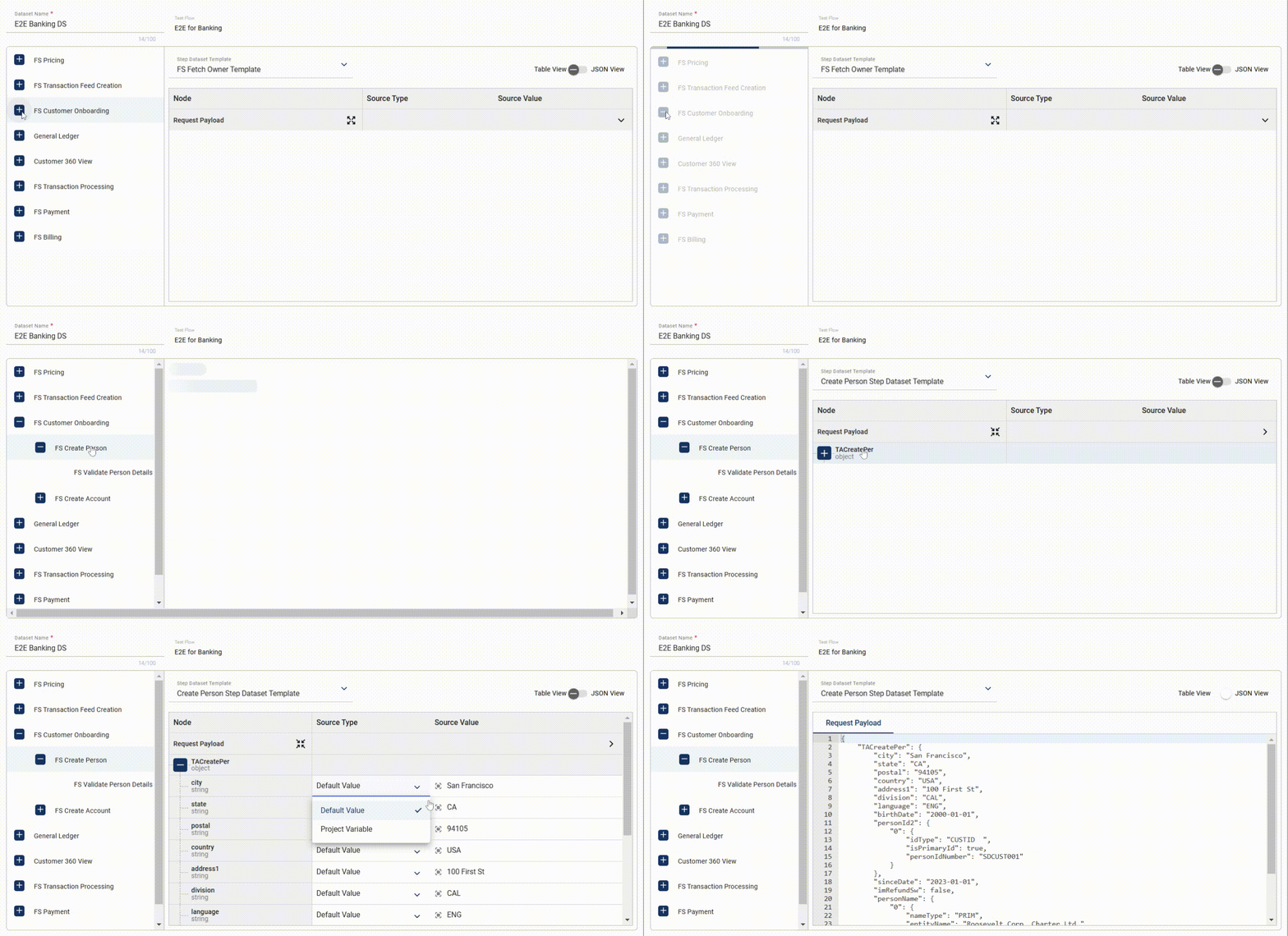
Dataset Templates

TA v3 simplifies data management with flexible dataset templates that support CSV, JSON, and database table formats, allowing diverse test data to be easily incorporated into test scenarios.


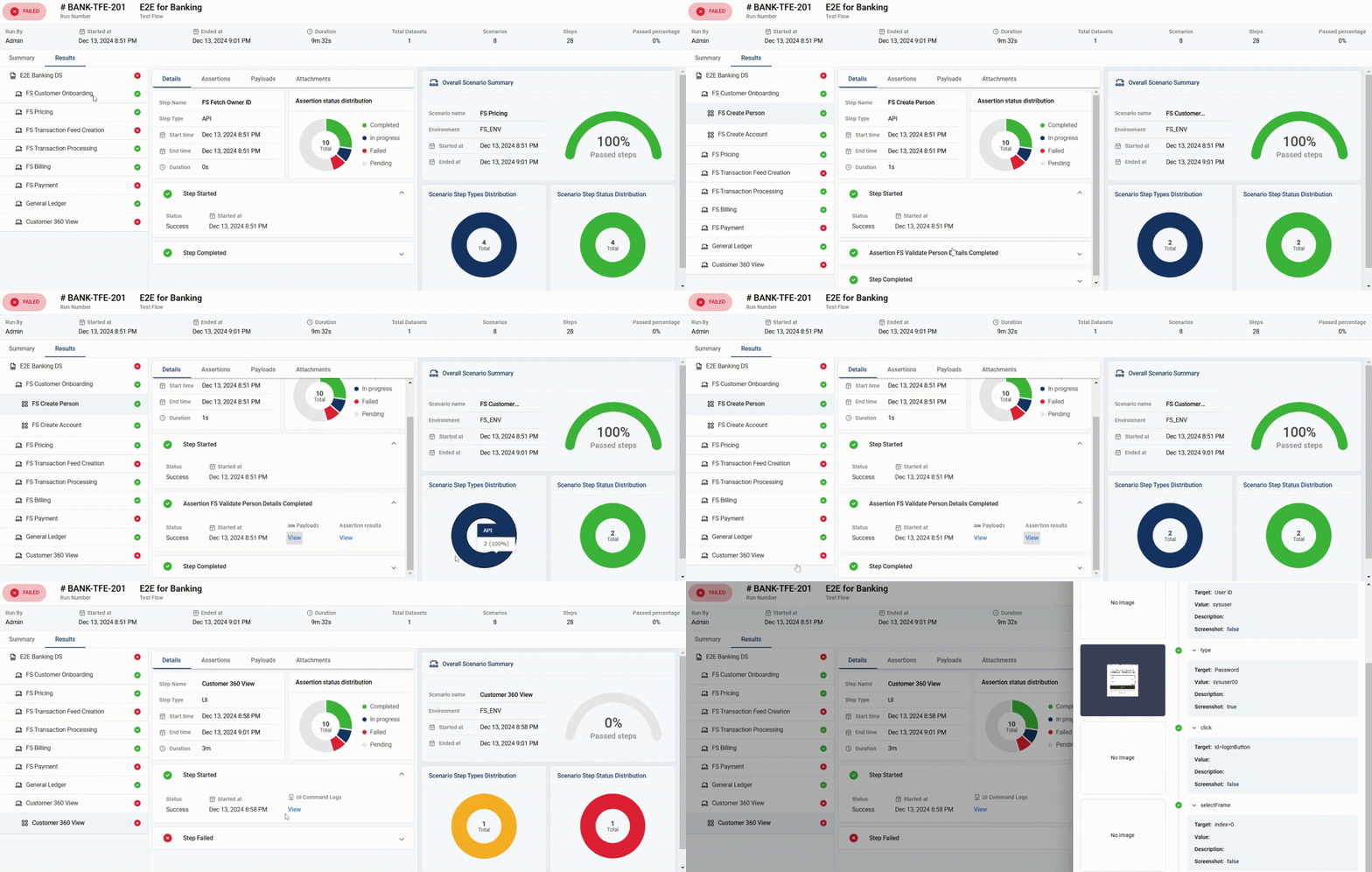
Comprehensive Test Results

TA v3 provides detailed insights into both the scenario and step execution. Scenarios are structured hierarchically, with each step clearly defined and placed within its corresponding scenario. This structure ensures full traceability for each test run, allowing for a thorough review and analysis of the results.

1 - Release Notes

1.1 - 2026 Release Notes

This release notes documentation contains package updates and the list of new features and fixed issues for all Test Automation releases in 2026.

For the most recent product highlights, see What’s New in Test Automation.

Test Automation 3.8.0

Release Date: 11 July 2026

New Features

This section provides the list of new features and enhancements that have been added in this release.

Affected Module Description
Assertion Additional filters have been added to the Assertion page.
Dataset
Step
Datasets now support pattern-based data generation, including Faker-based dynamic random values.
Dataset
Flow
Result
Enhanced dynamic validation capabilities have been added, including configurable validation modes, operator-based condition evaluation, fixed-index, any-row, all-row, and dynamic row validation for end-to-end integration testing.
Report Key data values can now be displayed as strings.
Result A new event-driven execution engine has been introduced, providing checkpoint persistence, pause, resume, stop, restart, live execution streaming, parallel execution, execution graph support, node executors, Kafka integration, and improved execution reliability.
Result CSV for ALL_ROW_VALIDATION assertions can now be dowloaded.
Run The Run module now supports API integration and feature toggling for the new execution engine.
Step The Step page now displays the scenarios and test flows associated with each step.
UI Updated the user interface with the PrimePalette Design System v2.

Fixed Issues

This section provides the list of issues that have been fixed in this release.

Affected Module Description
Assertion
Step
Fixed an issue where the schema list was not loading when creating an assertion.
Assertion
Step
Schemas now load correctly after running a query step that resulted in a gateway timeout.
Assertion
Step
Fixed UI issues in the Assertion and Step modules.
Dataset Bulk datasets now work correctly for datasets containing pattern values.
Dataset Bulk datasets now work correctly for parallel execution flows.
Dataset The Add Input button and delete icons have been removed from the Assertion section of the Dataset module.
Dataset
Step
Result
Long names are now fully displayed in tooltips.
Flow Exported flows containing a large number of step dataset templates can now be imported successfully.
Flow Fixed an issue where the Time Out value is defaulting to 0 when it was not manually set.
Flow Fixed an issue where changes were not detected after saving a flow.
Flow Fixed an issue where a flow was still imported after clicking Cancel during the import process.
Flow The asterisk * indicator is now displayed when adding or modifying a step or scenario.
Flow
Result
Fixed an issue where the second scenario executed even though the previous scenario had failed.
Notifications Fixed an intermittent issue where the session timeout notification appeared unexpectedly.
Report Custom reports can now be generated for test flows containing the File-to-File assertion type.
Report Fixed an issue where the first URL was incorrectly displayed in reports for flows containing multiple scenarios with different URLs.
Report Fixed an issue where custom reports generated from manually stopped executions could not be opened.
Report Scenario sequences in datasets and reports now match for reports generated from parallel executions.
Result Fixed an issue where linking from a UI step to an assertion did not work when the input node type was set to Parent Step Request.
Result Variable paths are no longer displayed in the Request Body of assertions when linking test flow variables from UI steps.
Result Query linking using a test flow variable with a response value from a query step is now working correctly.
Result Assertion results are now displayed in the Results module.
Result Fixed an issue where a flow fails when using a digit syntax in the pattern value.
Result Alert popup messages can now be captured in screenshots and included in the test report.
Result Fixed an issue where only the first index value was passed when linking values from an upload step response.
Result File upload/download step linking to a multipart API step is now working correctly.
Result Fixed an issue where extra characters were displayed in assertion columns.
Result Fixed an issue where numeric values in the target linking path were ignored.
Result Fixed an issue where files uploaded during UI step execution were not displayed in the Details tab, even though they appeared during live execution.
Result Fixed an issue where the TestRail link was no longer visible after syncing a flow with TestRail.
Result Fixed overlapping text for passed steps in diagrams within the Result module.
Result Fixed an issue where fail nodes were not executed when a scenario or step failed.
Result
Step
Fixed an issue where Type commands were cleared by the Send Keys command.
Result
Step
The Store Attribute command now works as expected.
Step Scenario filter criteria are now available in the Step module.
Step Fixed an issue where the Download button was not visible in UI steps.
Test Suite Fixed an issue where the Test Suite search and filter pages took too long to load.

Test Automation 3.7.0

Release Date: 06 May 2026

New Features

This section provides the list of new features and enhancements that have been added in this release.

Affected Module Description
Assertion
Dataset
Flow
Result
File comparison assertion added with detailed validation options.
Dataset A versionId parameter has been added to the request body when calling the check-datasets endpoint.
Dataset Filters for Scenario and Test flow names added to dataset screen.
Dataset
Flow
The syncDataset API now updates the inputs node of assertion payloads when synchronizing data.
Dataset
Flow
The system now detects changes to validation nodes in assertions and marks the dataset as out of sync.
Dataset
Flow
Result
Scenario name reuse is restricted across versions; backend errors now shown in UI.
Dataset
Result
Step
Custom pattern support added with reusable definitions and snippets.
Environment ORMB Auth renamed to OUAF Token.
Environment OAuth Password Credentials authentication is now supported.
Flow Deleting a scenario now prompts whether to remove it from the flow or delete it entirely.
Flow Deleted scenarios are no longer retained in cache.
Multiple Modules Sorting options now include Alphabetical and Most Recently Created/Modified.
Report Skipped steps and scenarios are now correctly displayed in execution graphs.
Report Execution Summary now includes dataset-level execution status for failed runs.
Report Total Scenarios graph now includes failed and skipped steps.
Run Model Scenario table updated with accordion layout, schema selection, and filtering.
Run Model Run configuration now includes dataset search, selection count, and step/schema selection.
Step Query-type steps can be saved even when no rows are returned, with a warning confirmation.
Step Project variable support added to UI Step Details screen.
Step Password values are now masked in UI and templates.
Test Suite Deletion of a test suite is restricted when a scheduler is configured.

Fixed Issues

This section provides the list of issues that have been fixed in this release.

Affected Module Description
Bulk dataset Minimum character length is now validated during bulk dataset creation, ensuring all inputs meet the required criteria.
Database The created_at and modified_at fields are now populated correctly in the database during entity creation and updates.
Dataset Update Dataset API now handles null step dataset IDs by assigning existing IDs.
Dataset Fixed bulk dataset Excel upload issue showing missing values incorrectly.
Dataset Project variables now resolve correctly in UI step payloads within bulk datasets.
Dataset Fixed dataset screen issues with payload display and assertion editing.
Dataset Invalid bulk uploads now show proper error messages.
Dataset Reuploading a previously removed file no longer incorrectly triggers an empty field validation error while creating a dataset.
Dataset The dataset name is now validated to prevent creation of duplicates when the same sheet is uploaded more than once.
Dataset The empty file upload is now validated during bulk dataset creation and an error message is now displayed.
Dataset
Flow
Fixed an issue where dataset sync failed when assertions were added or removed in the test flow.
Dataset
Run Setup Form
The dataset out-of-sync error message is now correctly handled when users change node, node type, or value in dataset assertions.
Environment Fixed UI overlap issue in environment details.
Environment The password required message is now correctly displayed in the SFTP details tab.
Environment
Test Suite
Deletion of environments and databases is now restricted when configured in test flows within a Test Suite.
Flow Fixed issue selecting _data as source and _data[0] as target during variable linking.
Flow Fixed an issue where an error message was displayed after accessing a test flow.
Flow Fixed an issue where test flow saving was blocked due to intermittent scenario reference validation.
Flow Fixed a UI overlap issue where the step type popup was covering the Assertion section.
Flow Changes to Input Nodes in API type Assertion Flow are now saved without triggering errors.
Flow
Dataset
Result
Fixed an issue where execution failed with a “content is null” error after syncing the dataset.
Flow
Result
Fixed execution errors when adding or removing assertions in an existing flow.
Flow Fixed duplicate validation and save issues when updating a test flow name.
Flow Single assertion creation now results in one assertion per action.
Flow AI assertion icon is no longer displayed when OpenAI is disabled.
Flow Available nodes for linking are now displayed correctly after step updates.
Report Fixed an issue where step sequencing was incorrectly displayed in generated reports.
Report Fixed run summary cropping and missing scenario step status image.
Report Scenario graph now includes skipped status.
Report Visual graph now represents status segregation based on total scenarios.
Report Scenario-based visual status and percentage calculations corrected.
Report Graph orientation is now aligned left-to-right.
Report Base URL and AUTH values are now properly populated in reports.
Result Filtering on the Result screen is now correctly applied based on selected version.
Result Executions now handle payloads containing null or empty values correctly.
Result Store command link value is now correctly mapped to the target steps.
Result Scenario start date and time is now correctly displayed on the Run Results page.
Result
Step
Non-secret variable values are now correctly resolved and displayed.
Result
Step
UI steps now correctly handle combined while loops and if conditions.
Result
Step
The output command now correct displays null values in the response when a step has not been run, included on the Test Flow screen and other affected modules.
Run setup form Dataset and Flow lists are now displayed in scrollable views.
Run setup form Dataset search now supports spaces between words.
Settings Replaced the label Test Assistant with Test Automation on the Settings screen.
Settings Authorize JIRA button disabled while editing details.
Step The Description field is now mandatory for store commands.
Step Store commands now require matching description and value fields.
Step SAME AS RTA-4959.
Step Removed dummy options from the Source Type dropdown.
Step All expected commands are now displayed in the Command dropdown.
Step Fixed tooltip issues caused by incorrect project variable selection.
Step Fixed checkbox selection issue for certain input commands.
Step Steps can now be saved using previously deleted names.
Step Project variable value is now fully visible in dropdown.
Test suite Filters on the Test Suite screen now work correctly.

Test Automation 3.6.0

Release Date: 16 Jan 2026

New Features

This section provides the list of new features and enhancements that have been added in this release.

Affected Module Description
Dataset Step-dataset API calls on the Dataset screen are now only loaded when needed, or all at once if required, to speed up scenario expansion and step interactions.
Flow You can now see which scenario or test flow a step belongs to directly on the Step and Test Flow pages.
Flow A new Refresh button has been added to the Test Flow screen to update the scenario used count immediately after removing a scenario, without needing to reload the browser.
Results You can now filter results by Test Suite code on the Results page, making it easier to find all test flows executed by a specific test suite.
Step You can now use Form Data in API steps for request bodies and templates. You can define, reuse, and map Form Data across steps, flows, and datasets, with full visibility in templates and execution results. Uploaded files and values remain manageable throughout the entire test flow lifecycle.
Test Suite The Cancel button is now hidden on the Test Suite screen when a scheduler’s last iteration is running or has already executed, leaving only the Edit option available to prevent invalid cancellations.
Test Suite Scheduler You can now schedule your Test Suite runs exactly when you need them, as a one-time execution or on a recurring daily, weekly, monthly, or yearly basis. A new Schedule option on the Test Suite page has been added for you to pick dates, times, and recurrence rules that fit your workflow. Built-in validations have also been added to help ensure your schedules are set up correctly.

Fixed Issues

This section provides the list of issues that have been fixed in this release.

Affected Module Description
Assertion Fixed an issue where the Send button becomes disabled and the assertion body becomes empty when saving an assertion.
Dataset The Dataset search is now working properly.
Dataset The correct version is now reflected in the associated assertion of a dataset.
Dataset Duplicate dataset names are now validated.
Dataset A warning message during Dataset sync is now displayed when a scenario is deleted from a flow.
Dataset Fixed an issue where the Scenario, Step, Assertion details page are just loading when creating a dataset in a test flow with scenarios that do not have any steps.
Dataset / Flow Fixed an issue where dataset and test flows can be deleted even if they are used in a test suite.
Flow Fixed an issue where empty arrays can be selected as a source or target.
Flow Fixed an issue where the configured step timeout resets when the step is updated.
Flow Fixed an issue where an imported test flow is not automatically added to the list of test flows.
Flow The Usage Details tab now correctly updates after saving a test flow, showing the actual usage of steps and scenarios across all test flows instead of displaying 0 flows.
Flow Fixed an issue where some characters were being added to the Flow name in the Details tab of associated scenarios and steps.
Project Fixed an issue where project variables with invalid characters are successfully created.
Results The Started At label is now displayed again in the Result Detail screen.
Results Fixed an issue where the API base URL is displayed for UI steps.
Results Fixed an issue where the executions are failing due to logic changes when using a test flow variable.
Settings Fixed an issue where the entire page was disabled when the Integrations page was loading.
Step Fixed several front end issues when downloading large files.
Step The store command for a UI step is now working properly.
Step Duplicate step templates are now validated.
Test Suite Unsaved changes modal is now displayed when navigating to another module after making unsaved changes.
Test Suite Test Suite handling has been improved to address issues with names containing special characters. Test suites with only special characters now display correctly across all views and can be deleted without leaving invalid entries.
Test Suite A warning message is now displayed when deleting a flow from the Test Suite module.
Test Suite The selected version is still visible even after focusing on the Version field in the Test Suite page.

1.2 - 2025 Release Notes

This release notes documentation contains package updates and the list of new features and fixed issues for all Test Automation releases in 2025.

For the most recent product highlights, see What’s New in Test Automation.

Test Automation 3.5.0

Release Date: 30 Sept 2025

New Features

This section provides the list of new features and enhancements that have been added in this release.

               
Affected Module Description
Assertion APIs to check and delete assertions have been created.
Assertion Assertions can now be deleted in the Assertion module. If a dataset is used in a flow, it will not be deleted. Instead, a list of all flows using the dataset will be displayed.
Assertion
Dataset
Assertions associated with a dataset cannot be deleted in the Dataset module.
Dataset An assertion can now be enabled or disabled in the Dataset module. If an assertion is disabled, details cannot be viewed or modified.
Dataset Flows using out-of-sync datasets are now prevented from being executed.
Dataset
Flow
Out-of-sync datasets can now be synced.
Flow Test flows can now be deleted in the Flow module. When a test flow is deleted, all associated datasets will also be deleted.
Flow Test flows can now be imported from an exported flow file.
Flow Test flows can now be exported to a JSON file.
Flow Assertions can now be generated with an AI module.
Flow Multiple AI-generated assertions can now be merged into a single assertion. Also, an assertion can be unmerged to retrieve the individual assertions.
Flow AI-generated assertions can now be edited before applying them to the step.
Flow A timeout can now be specified to define how long a step should wait for a response before marking it as failed.
Flow The Parent Step Request and Parent Step Response node types are now supported in assertion inputs and expected fields.
Flow An Import API is now available to process the export file created by the Export API.
Flow An export API is now available to create an export file containing test flow components.
Flow
Project
The icons in the version form have been replaced with Cancel and Save buttons.
Flow
Project
Modal actions are now aligned properly.
Flow
Project
All details in the side form are now visible even after resizing it.
Flow
Scenario
Step
Character limit for Step Description and Scenario Description fields are now 1000.
Flow
Settings
[FE] Migrate Large Feature Module from RDS → PDS — Plan
Project An API to delete a project and all its associated entities is now available in the Project module.
Project An API to display the count of all associated entities is now available in the Project module.
Project Projects can now be deleted in the Project module. If there are any associated entities, they will be displayed before the deletion is confirmed.
Run Result Screenshots and reports are now stored in different folders for each step.
Settings AI modules can now be integrated with TA. Configurations are handled in the Settings module.
Step Steps can now be deleted in the Step module. If a step is used in a dataset, it will not be deleted. Instead, a list of all datasets using the step will be displayed.
Step A value for UI step can now be configured as a file or a text.
StepA step that has been deleted in a test flow now remains accessible in other project versions it was associated with.
Step
Run Result
Files are now displayed and can now be downloaded when viewing the unit test result of an Upload UI step.

Fixed Issues

This section provides the list of issues that have been fixed in this release.

Affected Module Description
Assertion The Send button is now enabled when all required fields have been populated.
Assertion Fixed an issue where the Request Body field is emptied when saving an assertion.
Assertion
Flow
Step
Query and path parameters can now be configured for API steps in the Assertion and Flow modules.
Authentication Fixed an issue where ORMB environments requiring only a single-step authentication (ORMB Authorization API) were incorrectly following a two-step process, resulting in authentication failures in services such as the load batches API.
Dataset Fixed an issue where missing values in required user fields of Excel dataset templates were replaced with NA instead of an error message.
Dataset Fixed an issue where the template name from the first selected step was incorrectly applied to subsequent steps.
Dataset The Save and Run buttons are now enabled when a dataset has been modified.
Dataset The dataset is now displayed in the Results module during execution.
Dataset The default version is now being captured by the Version field when creating a new dataset.
Dataset The warning message for dataset configuration using the wrong version is now displayed properly.
Dataset Fixed an issue where the step payload is not displayed during dataset creation when the version is being changed.
Dataset Fixed an issue where the default value is being used instead of the new value configured for execution.
Dataset The Integer data type is now accepted when uploading a bulk dataset.
Dataset Fixed an issue where the page becomes unresponsive when clicking anything but the Save button during entity modification.
Dataset
Flow
Fixed an issue where subsequent steps are loading even if the first step is not yet completed.
Flow Fixed an issue where a testflow with an associated dataset can be deleted.
Flow Fixed an issue where the dataset template and steps are loading when viewing a test flow in a version where it was not created.
Flow Fixed an issue where datasets not associated with the selected version are displayed when configuring a flow.
Flow The response payloads are now displayed for queries executed in the Flow module during step linking.
Flow Query steps created in the Flow module are now working as expected.
Flow Fixed an issue where multiple executions were created when running a flow with multiple environments.
Flow Fixed an issue where the Environment and Dataset details were hidden when the scenario name is long.
Flow Fixed an issue where passing executions have failed steps.
Flow Fixed an issue where an error was encountered when creating a test flow with a name that had already been deleted.
Flow Fixed an issue where a deleted test flow was accessible by ID.
Flow
Scenario
Scenario description tooltip now displays the entire content, even if it has 1000 characters.
Flow
Step
Fixed an issue where payload attributes are not displayed even if the associated template has a step with attributes.
Flow
Step
Fixed an issue where a Query step fails in the Results module but passes in the Step module.
Flow
Step
Correct screenshots are now displayed for UI steps executed in the Flow module.
Flow
Step
The store command is now working properly.
Flow
Step
Fixed an issue where error messages are encountered when linking a variable from a Batch step to an assertion.
Report The Executed For Project report field now correctly displays the project name.
Results Fixed an issue where duplicate results entries are being displayed on the Details tab.
Results The column texts on Assertion Results no longer overlap.
Results Fixed an issue where the first variable with a value similar to other variables is displayed in the UI logs.
Results Secret passwords are no longer displayed in the UI logs.
Results Fixed an issue where a failed step attempting to download a non-existent file was not displayed in the Results page.
Results A proper error message is now displayed when executing a test flow that has no assertion input fields.
Results Fixed an issue where the assertions list is empty when one target validation is non-existent.
Results Success and failure banners are now disappearing automatically.
Results Failed UI steps now include screenshots.
Results Fixed an issue where text values were displayed as hyperlinks.
Results You can now use a Run Number filter in the Run Results module.
Run The filters on the Run module are now functioning as expected when applied.
Step Fixed an issue where the verifyElementPresent captures the step description as the Target.
Step UI commands that are configured to have blank values capture the Target values.
Step A space is now accepted as a valid character for headers of API steps.
Step A PDF file can now be uploaded or downloaded for an SFTP step.
Step The UI SIDE file from TA version 2.x.x can now be used in TA version 3.x.x.
Step The Upload button is now displayed for all UI File Upload steps.
Step Step response payloads are now correctly displayed for steps with customized names or queries executed in the Flow module.
Step Fixed an issue where the Update button is disabled after updating the step name.
Step Variables are now working properly in UI steps.
Step Correct application URLs are now displayed in UI steps.
Step The following commands are now available for use: do, repeatif, while, end, and store.
Step Fixed an issue where the screen gets refreshed when executing the do command.
Step Fixed an issue where the result is not consistent when running a UI step.
Step Fixed an issue where nodes are not captured when creating a new UI step default template.
Step Fixed an issue where error messages are encountered when loading schemas or executing flows that take more time than expected.
Step Fixed an issue where a UI step gets stuck when an element is not found.
Step Fixed an issue where the other commands are overwritten after saving modifications while the filter is applied.
Step Fixed an issue where an unselected header was included during execution in the Step module.
Step The No image error message has been replaced with NO IMAGE SELECTED.
UI The application logo has been replaced with the updated one.

Test Automation 3.4.0

Release Date: 16 July 2025

New Features

This section provides the list of new features and enhancements that have been added in this release.

Affected module Description
Dataset A new versionID parameter has been added to the GET API response.
Environment You can now upload a .pem file when using SFTP details for your test environments.
Project In the Integrations tab, you can now search for a project by entering a keyword or the full project name in the Project Name dropdown and then, select the corresponding project name.
Run Result A copy icon allowing you to copy the JSON payload data has been added to the Results details popup window.
Run Result Assertions in WARNING are now represented by light gray color in the Assertion status distribution chart. Additionally, the results section for assertions in WARNING has been removed as the section does not display content.
Step The Beautify button has been replaced with a beautify icon and is repositioned near the scrollbars.
Test Flow When syncing the Test Flow to TestRail, the Sync Test Flow to TestRail popup window now lists all the scenarios and steps to be synced.

Fixed Issues

This section provides the list of issues that have been fixed in this release.

Affected module Description
Assertion The Rest Catalogue button in the Assertion Module is now enabled and working properly.
Bulk Dataset Bulk dataset can now be uploaded.
Dataset Test flow execution in the Dataset module is now working properly.
Dataset Fixed an issue where some fields are automatically left blank after saving a newly-created dataset.
Dataset Fixed an issue where datasets cannot be saved after modifying the assertions.
Dataset Dataset templates not created at the time during the step creation can now be selected when creating a new step.
Dataset An option to disable assertions during test execution at the Dataset module has been added.
Dataset Fixed an issue where a duplicate error message is displayed when creating a new and unique dataset.
Dataset Correct datasets are now fetched when executing tests from the Dataset module.
Environment The PassPhrase field in the SFTP details is now an optional field.
Project Project variables can now be created.
Run Result The View links for Payloads and Assertions results on the Results page are now working.
Run Result Fixed an issue where batch logs are showing in the assertions associated with a Batch step type.
Run Result Fixed an issue where the live execution was not displayed after deployment.
Run Result Fixed an issue where execution runs into an error when using Ocular authentication.
Run Result Fixed an issue where the status of multiple dataset executions displays in progress when it was already completed.
Run Result Fixed an issue where the execution status displays completed when no dataset was executed during multiple dataset executions.
Run Result The Start a run button in the Results module is now working.
Run Result Fixed an issue where the first step in running a flow results in an internal server error.
Run Result Fixed an issue where the configured API Base URL is displayed when viewing an SFTP upload or download step.
Run Result Fixed an issue where the scenario displayed on the Run screen is not the same with the order configured in the test flow.
Run Result Query step with query assertion is now working properly.
Run Result Batch execution is now working properly.
Run Result SFTP file upload reports can now be downloaded.
Run Result The spacing between the assertion name and status is now displayed properly on the Assertion Run Result page.
Run Result Fixed an issue where a variable value is not displayed in the UI log when the same value was set for a secret variable.
Run Result Fixed an issue where the (empty object) error is displayed even when entities are successfully created.
Run Result Failed assertions with Continue assertions on failure ticked now do not block the test execution and continue to run the following assertion.
Run Result The assertion results are now consistent with the assertions and are functioning properly.
Run Result The value displayed under Duration in the Run Result page now displays the same value under Duration in the Details tab.
Run Result The Filter Criteria in the Results module is now working properly.
Run Result The values in the assertion module and Validation popup window now displays the same assertion URLs.
Run Result Execution is now working properly when the value is updated in assertion during dataset level and when project variable is selected as an input.
Run Result Fixed an issure where a success message is displayed when certain steps were not execute and assertion status is now working porperly.
Run Result Fixed an issue where multiple executions in parallel remained in Queued runs.
Run Result SFTP upload is now working properly even when the overwriteFileIfExisting node is false.
Setting The Settings page is now displayed properly.
Step The Templates tab in the New Step popup window is now working properly after uploading or downloading files.
Step The Templates tab is now enabled for the Upload and Download steps even after making changes.
Step UI logs are now displaying properly.
Step The Update button is now enabled and working properly when renaming the step File Upload and File Download step names.
Step Fixed an issue where a validation disappears when saving a step.
Step The Update button is now disabled when entering a new command and not selecting from the dropdown.
Step The Save button is now disbaled after an invalid file upload.
Step Appropriate error messages are now displayed after running a query in unit testing when an incorrect value is entered.
Step The verifyElementPresent and verifyElementNotPresent commands are now displayed and working properly.
Test Flow Fixed an issue where newly-created test flows cannot be saved.
Test Flow Fixed an issue where query assertion nods were not displayed in the Assertion Inputs popup window.
Test Flow Fixed an issue where the Sync button is still displayed even after turning off the TestRail integration.
Test Flow Fixed an issue where a new tab in the browser is opened after clicking the Run button in the Run Setup Form.
Test Flow Test flow with multiple scenarios can now be synced with TestRail.
Test Flow A warning message is now displayed when updating steps associated with a scenario.
Test Flow Cloning is now required when updating steps associated with a scenario.
Test Flow Fixed an issue where a duplicate test flow can be created.
Test Flow Entering a name in the Create / Select Step dropdown now only suggests existing steps instead of the Rename to [Name] button.
Test Flow The assertion and scenario filters in the Flow module are now working properly.

Test Automation 3.3.0

Release Date: 11 June 2025

New Features

This section provides the list of new features and enhancements that have been added in this release.

Affected module Description
Flow An option to sync a test run to the TestRail automatically is now available in the Run Setup Form.
Project Projects from a TestRail can now be used in Test Automation. Additionally, the test cases within a project can now be synced.
Project A Test Case Management section allowing you to select the application and TestRail project for integration is now available in the Integrations tab.
Report Minio properties are now in a yaml file.
Report The report now displays only the commands with screenshots.
Report Command descriptions are now displayed instead of the xpaths.
Report When generating a report, the Report Name field is automatically filled with a value that can be edited.
Report Sections to be included in the report can now be specified.
Report Separate files for each dataset used in the test execution can now be generated.
Report A frontend-generated summary report can now be downloaded by clicking the Download Run Summary button.
Report The live feed of test results now automatically retries when requests fail or time out.
Results The TestRail run status can now be viewed in the Run Results screen only if the Sync Run feature is enabled.
Settings A new Integrations page has been added to the Settings module. This page allows users to enable or disable the integration of applications with Test Automation. Additionally, it provides an overview of the integration status for each application.
Step A search option has been added to the catalog popup for selecting services.
Step The process dates for newly created batch step templates are now shown as one day before the business date.
Step The String source type can now handle empty string and date format default settings during template creation.
Step
Test Flow
The behavior of the Apply to Step and Update buttons has been improved.
Step
Test Flow
The rename to step feature has been removed and the behavior is now automatically applied when clicking the Update or Save button.
Step
Test Flow
Creating a template is now simplified.

Fixed Issues

This section provides the list of issues that have been fixed in this release.

Affected module Description
Assertion The Rest Catalogue is now available and displays the correct items.
Dataset Fixed an issue when uploading a bulk dataset.
Dataset Fixed the indicated supported file format from .side to .xlsx when uploading a bulk dataset.
Dataset Fixed an issue where the contents of the dataset are not updating without refreshing.
Dataset Fixed an issue where the user input variable name is set as the Source Value if the template containing that variable is selected in the dataset.
Flow Fixed an issue where a test flow with steps from 2 different versions cannot be executed.
Flow The step linking is now working for two different scenarios with the same steps.
Flow Fixed an issue where deleting a flow in a version also deletes the same flow in other versions where it is configured.
Flow The node name is now displayed correctly for API steps.
Login Password can now be reset.
Project All images and icons are now properly displayed in TA.
Project Fixed an issue where the click area of the next and previous page icons overlap.
Report The sequence of the UI steps in the report is now fixed.
Results Fixed an issue where the uploaded and downloaded files were not visible after SFTP execution.
Results Fixed an issue where the variable values are not visible in the UI logs.
Results Fixed an issue where some UI logs are displayed as assertions.
Results Fixed an issue where the step level value was being used when executing an API step with query parameters.
Results Fixed an issue where execution remained in the queue even if it was already in progress or completed.
Results Descriptions are now displayed in the UI logs.
Results Fixed an issue where active run results are not being fetched.
Results Fixed an issue where an error message is displayed when using an OCULAR authentication type is used during execution.
Results Filters for Test Flow, Dataset, Environment, and Status are now available in the Run List and Run Graph.
Results The SFTP file upload reports can now be downloaded.
Results The Store Attribute command is now working properly.
Results Fixed an issue where an empty Response Body is returned for Batch and API steps.
Results The Verify Text command is now working properly.
Results Fixed an issue where executing a batch with API or Query assertions is failing.
Results The assertion headers are now displayed properly.
Step Fixed an issue where a command can be entered even if it is not in the dropdown list.
Step The Templates tab is now enabled for the Upload and Download steps even after making changes.
Step Fixed an issue where the Save button is still enabled even after an invalid file was uploaded.
Step Fixed several issues where tabs and buttons are enabled even if some of the required fields are not supplied yet.
Step The beautify functionality is now working for the Query step.
Step Fixed an issue where the template is not visible after navigating to the Templates tab during step creation.
Step A notification now appears for unsaved change when navigating to a different page.
Step Fixed an issue where a validation disappears when saving a step.

Test Automation 3.2.0

Release Date: 05 May 2025

New Features

This section provides the list of new features and enhancements that have been added in this release.

Affected module Description
Assertion
Dataset
Flow
Project
Step
Modules displayed in the left menu are now limited by the configured authorization.
Dataset Default dataset template is now required to be provided when creating or updating a dataset.
Dataset New random data is now automatically generated for every execution without changing the request field manually every time.
Dataset

File details that are displayed in the Step module are now displayed in the Dataset module as well.

Dataset The CONTAIN operator can now be used in configuring assertions.
Dataset
Flow
Database can now be specified for each scenario.
Flow A new File Download or File Upload step node can now be added in a flow.
Flow The _ and - characters can now be added to a Scenario description.
Flow
Results
Test flow executions are now faster.
Project A default database can now be configured for a project.
Results The database name is now displayed in the Overall Scenario Summary section of the Results page when a scenario has a Query step.
Results A successful file upload or download is now displaying as Step Completed in the Results page. The uploaded or downloaded file is still present.
Results The value for the Storage Type field is now displayed in the Results page.
Results The Step Failed details are now displayed in the Results page.
Results File Download and File Upload steps are now displayed in the Results tab. The downloaded or uploaded files can be viewed in the Details and Attachments tabs.
Step The UI/X of the SFTP step type configuration page is now updated.
Step A File Download and File Upload steps types are now available.
Step A step dataset template is now generated after creating a File Download or a File Upload step.
Step If no application URL is configured, the specified URL in the SIDE file will be captured.
Step Variables are now accepted as input values in commands.
Step Execution of UI step types is not working properly.
Step SFTP upload files can now be overwritten. It also triggers an automatic update to the dataset template.
Step A new ORDS step type is now available.

Fixed Issues

This section provides the list of issues that have been fixed in this release.

Affected module Description
Assertion Fixed an issue where the success message popup appeared multiple times after updating an assertion.
Assertion A Query type assertion can now be created.
Assertion API assertions with path parameters can now be created.
Dataset Assertions in dataset can now be updated and reused in test executions.
Dataset The Test Flow Variable is now available in the Node Type dropdown list.
Dataset Fixed an issue where a duplication error message appears when creating a new dataset.
Dataset
Flow
Sequence of entities in test flow and in excel template are now matching.
Flow Fixed an issue where steps linked to a specific version in a default environment were unavailable when creating a new test flow with either no configured environment or a different one.
Flow Fixed an issue where API steps with path parameters cannot be linked.
Flow Fixed an issue where a new tab is being opened when clicking the Run button.
Flow

Fixed an issue where IWS were not being imported through the REST catalog.

Flow Fixed an issue where the input and output values were not being loading when creating a query assertion in the Flow module.
Flow Dataset sidebar in the Flow module is now displaying the expected data.
Flow Fixed an issue where a clone error message appeared when updating a step description that is not used in any scenario or flow.
Flow Path parameters of assertions are now displayed when creating a test flow.
Flow Fixed an issue where a newly-created assertion is linked to a different project that is opened in another tab.
Flow Fixed the notification message when adding a new scenario to a test flow.
Flow Fixed an issue where existing steps were not imported to the test flow.
Project
Results
Secret values are now hidden in Step request and response payloads.
Project
Step
The default template name is now updated when switching from one verstion to another.
Project
Step
Fixed an issue where a newly created step was linked to a different project.
Results Fixed an issue where an API step with assertions and multiple datasets executed only one dataset.
Results Test executions now display the correct status.
Results Configured assertions in the Flow module are now displayed in the Results module.
Results Fixed an issue where UI logs were duplicated after executing a UI test flow.
Results Actual values for Verify value command are now displayed in the Results page.
Results Fixed an issue where newly created test flow results were not displayed in the Results module.
Results Fixed an issue where assertion details were not displayed for scenarios with multiple steps, each or at least one step having an assertion.
Results Fixed an issue where test execution details could not be accessed in the Results module until the execution was finished.
Results Fixed an issue where test flows were in Queued runs when the test only have a UI step, and logs were not appearing in the Results module for tests that contain other step types.
Results UI steps with configured assertions are now running properly.
Results API steps with configured assertions are now running properly.
Results The Started at label is now replaced with Ended at.
Results Secret values are now hidden in the UI logs.
Results
Step
Same versions can now be created in different projects.
Results
Step
The live execution run results are now displayed properly.
Results Fixed an issue where a UI step failed during flow execution but passed in the step module run.
Results Assertion payloads are now displayed correctly, even if at least one assertion has failed.
Results Fixed an issue where the latest results are not fetched unless the refresh button is clicked.
Results Fixed an issue where failing tests were marked as Passed.
Results Warnings for verify commands are now added to the test execution logs.
Results Fixed an issue where details get mixed up when two different project names with identical project codes were executed in separate environments.
Results The number of passing and failing dataset executions are now displayed correctly in the Results page.
Results The Run By field is now displaying the correct value.
Results Fixed issues found during batch executions in multiple tenants.
Step Fixed an issue where the screenshot for the last command was not being displayed.
Step A template is now automatically removed from the list when deleted.
Step The verifyText command is now working as expected.
Step Fixed an isse where commented commands were still executed.
Step Fixed an issue where the Update button remained enabled even if an error was found in the Response Body.
Step The dataset used to excecute the query is now saved to the default template of that query.
Step Batch parameters are now placed properly in the batch template.
Step Fixed an issue where the template cannot be saved details were populated before the template name.
Step Fixed the search functionality for SFTP where it is not returning a file matching the search criteria.

1.3 - 2024 Release Notes

This release notes documentation contains package updates and the list of new features and fixed issues for all Test Automation releases in 2024.

For the most recent product highlights, see What’s New in Test Automation.

Test Automation 3.0.0

Release Date: 16 December 2024

Known issues

This section provides the list of known issues affecting this release, and are currently being investigated.

Affected module Feature description
Assertion API test scenarios with assertions are failing execution.
Assertion Executing a query assertion leads to an invalid HTTP method error message.
Assertion

The Continue assertions on failure feature is not

working properly.

Assertion
Step
The Send button on the API screen is not functioning when the API request fails.
Dataset Unable to enter expected values into a static node for a validation service.
Dataset When a dataset with an existing name prefix is uploaded, a successful notification appears, but the dataset is not created.
Dataset Dataset popup window does not properly display the JSON nodes.
Flow Choosing a Path parameter as a Target for a step leads to failed test execution.
Flow Linking an API step to a UI step leads to failing execution.
Flow Any linkings from a query to a query is not properly working.
Flow A variable can be removed from a step even if it is used as a source in another step.
Flow Executions using an Ocular authorization type fails.
Projects Some details on the Environment tab are partially visible.
Results The Duration fields on the Results dashboard display different values.
Results The Summary tab of the Run Details screen does not display any data.
results Results screen freezes when View Payload is clicked.
Results Failed scenarios are displayed as passed in the Results module.
Results A loading icon is displayed instead of an error message when the application is down.
Results An error message is displayed when a newly generated run ID is clicked. Re-clicking the run ID leads to the correct Run Details screen.
Results The environment URL is not yet displaying on the Results screen.
Step The changes made to the step dataset template in the new version are still reflected in the template of the old version.
Step Execution of UI step types is not working properly.

2 - Known Issues

2.1 - Known Issues

This documentation provides a comprehensive list of issues that may impact the application and its modules.

RIA Advisory is actively addressing these issues and ensuring that the application operates smoothly. Please be advised that we are taking all necessary measures to mitigate these issues and provide you with a seamless experience.

Release Notes

For the detailed release notes for the latest versions of Test Automation, see Release Notes.

Open Known Issues

This section provides the list of known issues affecting the current release and are currently being investigated.

The Reported version is also provided for each known issue, indicating the TA version where the issue was first discovered. However, these issues may still apply to other versions.

Affected module Description Reported version
Assertion AI Assertion is not working as expected. TA v3.8.x
Assertion Assertion CSV files are not displayed in custom-generated reports from the TA tool when the Assertion Validation Mode is set to ALL_ROW_VALIDATION. TA v3.8.x
Dataset Resetting the source value pattern may cause a persistent validation error and disable the Save button. TA v3.8.x
Dataset After adding a new empty scenario to a Test Flow, the associated Dataset may incorrectly display as In Sync instead of Out of Sync. The dataset-level sync warning is not updated until the dataset is refreshed or synchronized. TA v3.8.x
Flow Under certain conditions, the unsaved changes indicator (*) may not appear after modifying the test flow. TA v3.8.x
Flow Errors may not be displayed when opening a test flow that contains validation errors. TA v3.8.x
Flow
Step
Flow execution may fail after the default timeout even when a buffer timeout is configured for a step at the flow level. TA v3.8.x
Result The Stopped status filter is currently unavailable on the Result page. TA v3.8.x
Result The Run Number and Test Flow Name may appear cropped at the bottom in the Run Summary Report. TA v3.8.x
Step The file path in an SFTP file upload step cannot be updated. TA v3.5.x
Step During unit testing of Form Data API steps, form data keys that are deselected at the step level may still be sent in the request instead of being excluded. TA v3.8.x
Step If multiple query parameters were selected, only the last one is considered as part of the API request. TA v3.5.x

Fixed Known Issues

This section provides the list of known issues that have been fixed.

Affected module Description Reported version Fixed version
Dataset An error message is displayed indicating no datasets were found when opening the results of a test execution in progress. TA v3.3.x TA v3.8.x
Flow Running a flow with multiple datasets results in an error message. TA v3.3.x TA v3.8.x
Dataset Using a static number like 1234 as a Pattern Value does not trigger a validation error. TA v3.7.x TA v3.8.x
Dataset Test flow execution fails when using a pattern like d{5}. TA v3.7.x TA v3.8.x
Dataset Dataset sync does not work correctly when templates are updated with a Pattern Value. TA v3.7.x TA v3.8.x
Dataset Bulk dataset creation does not work for datasets containing Pattern Values. TA v3.7.x TA v3.8.x
Flow The duplicate flow error disappears after clicking on the scenario card instead of persisting as expected. TA v3.7.x TA v3.8.x
Flow Custom reports for test flows that include File-to-File assertions cannot be generated. TA v3.7.x TA v3.8.x
Flow
Step
Intermittently, steps created in the Test Flow are not visible in the UI despite being present in the database. TA v3.7.x TA v3.8.x
Step Only the first index value is being passed when a user links a value from the upload step response, instead of the complete set of values. TA v3.7.x TA v3.8.x
Flow Import flow is still executed even if the Cancel button was clicked. TA v3.5.x TA v3.8.x
Results The Reset button in the Filter Criteria window is not working. TA v3.5.x TA v3.8.x
Dataset When running multiple datasets in parallel, some performance issues may arise. TA v3.3.x TA v3.8.x
Dataset After clicking on the Download Template File or Upload Template file buttons, the values entered in the Enter Dataset Name Prefix field disappears. TA v3.4.x TA v3.8.x
Results The assertion results of a newly selected assertion are automatically replaced with the results of the initially selected assertion. TA v3.3.x
Results Once an assertion fails in a step, any subsequent assertions in that step are not executed. TA v3.3.x TA v3.5.x
Settings A 404 error is displayed when clicking Integrations on the left menu. TA v3.5.x TA v3.5.x
Flow Some characters are not being captured when entered in the Step Details and Scenario Details sections. TA v3.5.x TA v3.5.x
Flow Two files are automatically downloaded when a test flow is exported. TA v3.5.x TA v3.5.x
Results An error message is encountered when opening a custom report. TA v3.5.x TA v3.5.x
Assertion After updating the assertion name, the Save button is disabled. TA v3.4.x TA v3.5.x
Dataset Datasets fail to load when searching for a test flow not created in the currently selected version. TA v3.3.x TA v3.5.x
Dataset The option to disable assertions in a dataset is not yet available. TA v3.3.x TA v3.5.x
Dataset The Step Dataset Template field is not automatically updating after selecting a different dataset. TA v3.3.x TA v3.5.x
Flow A flow can be deleted even if a dataset is still associated with it. TA v3.3.x TA v3.5.x
Test Flow After updating the step name and saving, the step response is not displayed in the test flow. TA v3.4.x TA v3.5.x
Flow After updating a step in the test flow screen and running a query, the response payload disappears. TA v3.4.x TA v3.5.x
Flow The node does not respond while linking steps. TA v3.4.x TA v3.5.x
Results Execution is displayed as a success when there are steps that are not yet taken or the steps failed. TA v3.4.x TA v3.5.x
Run Results The status is still in progress after an execution is done. TA v3.4.x TA v3.5.x
Flow The Sync this Test Flow button remains active for flows with disabled TestRail integration. TA v3.3.x TA v3.4.x
Flow The order of the scenarios on the Run screen is not the same as the order in Flow. TA v3.3.x TA v3.4.x
Flow Assertion nodes are not displayed in the Flow screen when an assertion is renamed. TA v3.3.x TA v3.4.x
Project Deleting a project variable results in an error message. TA v3.3.x TA v3.4.x
Results Some assertion step execution details are not being displayed on the Results page. TA v3.2.x TA v3.4.x
Results The run time is not being displayed live on the Results page. TA v3.2.x TA v3.4.x
Results The values entered in the PASSWORD field are encrypted. TA v3.4.x TA v3.4.x
Results Statuses in Assertion Results and Assertion Details tabs have different results after execution. TA v3.4.x TA v3.4.x
Step The verifyElementPresent and verifyElementNotPresent commands cannot be executed at the unit and flow level . TA v3.3.x TA v3.4.x
Dataset
Flow
A flow with steps from different versions cannot be executed. TA v3.2.x TA v3.3.x
Flow Some features, when creating a step in the Flow module, are available even before the required data is provided. TA v3.2.x TA v3.3.x
Flow A test flow linked to multiple versions is deleted from all associated versions when it is removed from just one version. TA v3.2.x TA v3.3.x
Flow
Result
Linking to Query parameters is not working. TA v3.2.x TA v3.3.x
Result The UI logs are being displayed as assertion logs. TA v3.2.x TA v3.3.x